Wednesday, February 29, 2012

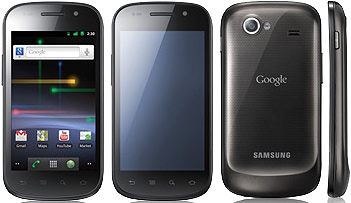
Samsung Kies Alternative: MyPhoneExplorer

After many hours of trying to figure out how to connect a colleague's Samsung Nexus S phone (GT-i9023) to its own-made sync software called Kies, I finally gave up. I have followed so many methods that some claim worked for them but just didn't for me and I was close at considering rooting this device that I don't even own. Samsung support sites were no use at all. It turns out that this phone has been racking up frustrations among those who bought it when they find the need to sync the phone to their PC for contacts, calendars, backup, firmware update etc. Don't get me wrong though, Samsung Nexus S is awesome in its own right, needless to say, being an Android phone with 2.3.3 Gingerbread on stock. It's just really the connectivity problem on Kies.


So I gave it another shot by installing Android SDK but still, to no avail. Then an old-school "ting!" finally hit me and why it took me that long I didn't know. I said to myself, "why not look for an alternative to Kies?" and once again, I found myself on google-mode.

And lo and behold... I found MyPhoneExplorer!

This software supports Sony Ericsson (SE) and Android devices and just right when I needed because I had to transfer contacts from an SE P1i phone to the Nexus S, which I already did.

MyPhoneExplorer is also capable of wifi and bluetooth connection that added flexibility and convenience for me. There are also cool extras like the ability to show the phone screen display over my PC/laptop and control the icons via mouse from there instead of tap/swipe. Text input was also made possible from my PC/laptop keyboard direct to the tablet... wireless!

There are certainly some areas for improvement like some quirks I encountered during sync process. I get disconnected occasionally on WiFi mode. The developer may also perhaps look into synching speed between outlook and phone.


Other than those, the tool is awesome. I just made it my main sync software now in lieu of Samsung Kies. So that's another reputation point stripped-off of Samsung's over the past year I've engaged their brand. They should seriously look into those issues on technical details (i.e. VPN functionality problem on GT-P1010 and firmware upgrade option to Gingerbread 2.3 to fix it) from their products and follow the much sought reputation of Apple in terms of quality and customer satisfaction.

Kies problem on Samsung Nexus S apparently is isolated on Kies itself because I'm able to make the phone work using MyPhoneExplorer. It shouldn't take that long to fix and it's been a year now since the phone's release, wth!?

Gladly, there are brilliant minds out there such as those from FJ Software Dev Team. 'Hats-off to them. ^_^

Monday, February 20, 2012

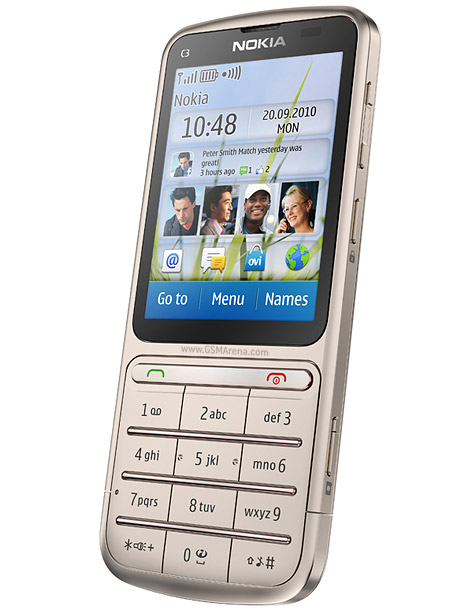
Nokia C3-01

Worst Nokia phone I've ever encountered.


- Touchscreen malfunctions easily
- Annoying bottom keypad
- Battery drains fast
- Battery heats up
- Too many more to mention

Troubleshooting is so frustrating, can't do hard reset 'cause it requires touchscreen access. If it gets a problematic touchscreen like this one I'm trying to fix, you're done. When it goes locked-mode (idle for 60 secs), can't unlock it 'cause it requires screen swipe / press. I had to remove the battery just to "unlock" every time. Well, maybe most touchscreen phones would have the same problem, but just 2 to 3 months use will make one experience this? Now I can't even respond to simple yes/no confirmation because it only accepts from touchscreen command.

So I've been getting lots of complaints from assignees, and looking at the forums, most of the cases are touchscreen related problems. I hope they finally do a product recall on this one.

It just wasted a good 3 hours of my time, 'giving up now >.<

Monday, February 06, 2012

File Collaboration via a Cloud Service

File collaboration or file sharing.

The way it's done traditionally in our environment is by email attachments. Still, many of our users can't seem to get away with it even that I've already introduced shared folders and mapped them directly to their desktops/laptops.

Just recently, a mandate from the upper management was given to project managers/members to make use of our MS-Project software in ensuring that projects are on-track and reported to the stakeholders, needless to say, in a manner that they have to be presented. So this "project-minded" people attended an MS-Project refresher course and collaborated on devising a system to make it work.

Moving straight to my part, the challenge for me is to ensure that these people working on their projects are "synchronized" at zero cost. I knew they had to make use of shared folders which are always available in our private network. But how is it when they are offsite with some means of internet access? One solution is via VPN which I already have in place, yet flexibility is an issue because it has its limitations.

And so I've thought of another solution that could complement that, a free online service called Dropbox.

In summary, Dropbox is an ingenious service that guarantees your files are "available anywhere" and can be accessed on multiple platforms be it on a desktop, laptop or mobile devices. I've been using it for a month or two now and it served me well in synchronizing my files among my devices, particularly to my android tablet.

Thing is, Dropbox is kinda personal as it seemed to be meant more for an individual use. When I first tried linking a shared folder to it, it did not allow. So to make it work in a corporate setup, one has to go through some work-around. Gladly I found this link which guided me (again, thanks to Google).

Now that it's working, I'm geared-up to deploy it among the project team members.Yay!


Dropbox as an Android App

Monday, January 23, 2012

My Top Android Apps


Six months of using Android on my tablet and smartphone exposed me to quite a number of useful apps. That short span of venturing through the marketplace and 3rd-party source of apk's made me witness a fast-paced apps development in the android ecosystem. But first the stats, Android Market has about 350k active apps available for download and compared to hitting 1 billion downloads between 2008 and 2010, it has reached 10 billion milestone by Dec 2011.


Btw, Apple's iTunes/appstore has 400k+ active apps and 15B downloads in latest stats while BlackBerry RIM has approximately 50k apps.

But even with these large number of apps to choose from, selection of top-rated (free/paid) app is not that difficult to do because we're guided by user ratings (5-star rating system) and editor's pick. User reviews are also there for the final kick before one is convinced to buy or download one.


Now as for own top choices, I've chosen not more than 3 from selected categories (not necessarily in order):


Business & Productivity
- ColorNote / Evernote
- QuickOffice Pro

- Goodle Docs

Communication
- Skype


Entertainment
- MoboPlayer
- Speaktoit Assistant

Books and Reference 
- Moon Reader
- ColorDict
- Appy Geek

Tools and Utilities
- AndSMB
- 2X Client
- Traffic Statistics

Games
- Cut the Rope
- Defender
- Medieval Defense

Friday, January 20, 2012

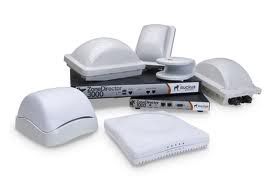
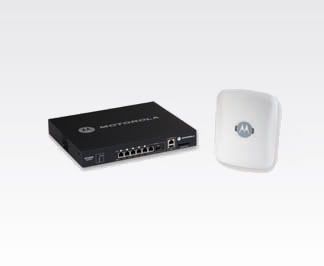
Project: Enterprise Wireless Solution

So we're now considering an enterprise-type wireless LAN solution, and it's about time.

Gone are the days when users mostly connect to WiFi just to check emails and browse the net. Now they demand uninterrupted use of enterprise apps such as ERP systems (Nav, SAP) and report generators (JetReports, Cognos), unadulterated VoIP and streaming audios/videos, and whatnot.

But as an evaluator, how we use it ain't plainly the criteria to consider whether to jump onto the technology or stick with the good ole cables (wired LAN). Besides, wireless APs or access points are still essentially being shared amongst client users connected to it compared to LAN switches that offer dedicated bandwidth per port. Nonetheless, wireless is the practical direction in enterprise connectivity to partially replace the more expensive and inflexible wiring setup.

So my take? I won't jump to a 100% wireless LAN infrastructure (probably not ever). I'd rather have it hybrid depending on the number and profile of users (desktops vs. laptops/tablet users)

Going back to the subject, I wonder which really is the better among these two wireless solution?


Ruckus Wireless ZoneFlex


Fast facts/myths:
1.) 90% of SM Malls nationwide are powered by Ruckus, someone told me.
2.) Claims 80% of worldwide enterprise traffic (can't find any proof just yet).


OR


Motorola Wing5 WLAN


Fast facts/myths:
1.) Awarded by Guinness in 2010 for the "most powerful access point" by streaming videos simultaneously to 80 laptops.
2.) Among the best of breed in the wireless network solution industry.


Btw,why not Cisco? Hmmm...

Tuesday, November 29, 2011

Android OS: First encounter

My first encounter with an Android operated device was back in June this year. It was a Samsung smartphone (forgot the exact model). I didn't own it but I had the chance tinkering it for a while and just like that, it made a lasting impression on me. An excerpt from Samsung website about their lines of smart phones describes Android subtlety yet concisely by my own comprehension (only the last statement though):
"...is an open-source OS based on a modified Linux kernel. It employs Java and Google-based Java libraries in running its applications. It has large community of developers writing applications (“Apps”) which makes it one of the more compelling platforms to date."

Who started it? Google? Not exactly. I will leave Wikipedia to delve into that detail and most of the rest. But one interesting fact that amused me in a bit is the version flavor of the OS; it follows an alphabetic and peculiar code-naming convention. The earliest version I actually know of in phone models that exist to date is Cupcake (v1.5) and Eclair (v2.1) (e.g. Samsung i5700). Followed by the widely-popular Froyo (2.2) version at its boom months ago. Next is Gingerbread (2.3) -- currently my phone version (LG P500). Then came Honeycomb (3.0) -- I haven't seen one. And the latest, Ice Cream Sandwitch (4.0).

Reminiscent of the experience when I first got hold of that Android powered Samsung phone was the feel and excitement while I was exploring it, which specifically led me to a number of game titles developed for it. One of which was "Medieval Castle Defense".


Now lame as it might seem, what has this game got anything to do with the Android topic?

Android, ergo, this game is:
1. easy to play/use but sophisticated
2. enormously fun (just tweaking the phone settings is quite a past-time, lol)
3. portable (e.g. Android being open-source is not exclusive to a particular phone brand).
4. free (same as #3)

But wait a sec, I'm not trying to compare this with iPhone's IOS.... yet. So that's gotta be in another topic. For now I'd just say, Android makes my life easier and happier (in a dif'rent way).

More on Android later.

Monday, November 28, 2011

The Beginning

I've decided to create a separate blog dedicated to my IT exploits. I realized that having one will allow me to chronicle, as the title goes, my undertakings in this vast and fast changing world of IT. Being a professional for 15 years now, I have been exposed to a lot of ITs growth (pun intended). Downside, my exposure has been limited to my present employer's account and personal day-to-day discoveries.

So for now, the topics I'd like to cover are IT solutions that are on-going and/or prospective specific to my environment. Of course, this blog is in no way meant to expose the IT infrastructure of the entity that I pledged to secure & protect in the first place. Also, this is not meant to recommend anything of sorts tech related, although there are probably bits and pieces that are worth sharing or learning from as I go.

Here are some of the topics I'd expect myself to write about:

- Server operating systems (more of Windows, a bit of Linux)
- Desktop operating system (Windows, a bit of Mac OS)
- Mobile OS (android, a bit of IOS)
- Business solutions (ERP, BI)
- Desktop & mobile apps
- Firewall (Fortinet)
- Antivirus
- Network / wireless solutions (routers, access points etc)
- Virtualization (VMWare)
- Software services (NMS, helpdesk system etc)
- Storage & DR Solutions (EMC Avamar, EMC SAN etc)
- Utilities
- Games

I wish to keep on and continue to extend my endeavor & enthusiasm in this field that I chose where I hope to get better no less. But to set the record straight, I'm no expert in this field. I just happen to be of no interest in any specialization because I believe it limits one's flexibility. I even skipped the chance of free certifications probably due to lack of confidence or I have no free time at all. Some of the certifications I find though are just paper. It's sad to be known that even this can be now be faked or work-arounds exist to easily get them (leaked exams etc). Anyway, the so called experts (true or not) are found everywhere after all. In fact, we can reach them in just a couple of search strings and through a bit use of common-sense. (hint: G--g-e)

Lastly, in the hope of keeping me sane from the demands of "it", this blog finally came to exist.

ArnoldO